
A stolen password can give a criminal the same access as a trusted member of staff. They may not need to break into your systems or exploit a technical weakness. They simply sign in to email, cloud files or accounting software and start looking for an opportunity.
That is why the question is not really whether multi-factor authentication is worthwhile, but when should businesses use MFA and where should it be enforced first. For most small and midsize organisations, the answer is sooner, and more widely, than they might expect. The key is applying it sensibly, so security improves without making everyday work needlessly difficult.
When should businesses use MFA?
Businesses should use MFA wherever a compromised account could lead to financial loss, data exposure, operational disruption or reputational damage. In practice, that means any account accessed from the internet, especially where it holds business information or provides administrative control.
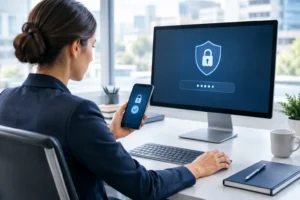
MFA asks for more than a password before granting access. A staff member might enter their password and then approve a sign-in through an authentication app, use a security key, or provide a code from a trusted device. If someone has obtained the password through phishing, password reuse or a data breach elsewhere, they still cannot normally log in without that second factor.
It is particularly valuable because password theft remains one of the simplest ways into a business. Staff can be careful and still be caught by a convincing fake Microsoft 365 sign-in page or a well-timed email impersonating a supplier. MFA provides a valuable extra checkpoint when human judgement is put under pressure.
For a business that relies on cloud systems, remote access or shared digital records, MFA should be a standard part of access control rather than something reserved for senior managers.
Start with the accounts that matter most
If MFA is not yet in place everywhere, start with the systems that would cause the greatest harm if accessed by the wrong person. This is a risk-based decision, not a one-size-fits-all exercise.
Prioritise these areas:
- Email platforms such as Microsoft 365 or Google Workspace, where password resets, sensitive correspondence and payment instructions often pass through.
- Cloud storage, customer relationship management systems and line-of-business software containing client, employee or financial data.
- Finance, payroll and banking platforms, particularly where payments can be created, approved or details changed.
- Remote access tools, virtual private networks, remote desktop services and device-management portals.
- Administrator accounts that can create users, alter security settings, install software or access multiple systems.
Email deserves special attention. A compromised mailbox does not just expose messages. It can allow an attacker to reset passwords for other services, impersonate a director or finance colleague, and monitor conversations before sending a believable fraudulent request. MFA on email accounts can stop many of these attacks at the first hurdle.
Administrator accounts should be treated even more carefully. Anyone with elevated permissions has the ability to make changes across your technology estate. Ideally, administrators should have a separate account for routine email and office work, with MFA required whenever they use their privileged account.
MFA is not only for remote workers
Some organisations assume MFA is necessary only when staff work from home. Remote working does increase exposure, particularly when personal Wi-Fi networks and unmanaged devices are involved, but the principle is broader.
Many cloud applications are accessible from any location with an internet connection. Even a team working entirely from an office in Sussex could have passwords targeted through phishing emails or leaked through another service. Once those credentials are known, an attacker can attempt to sign in from anywhere.
MFA also makes sense for shared operational environments. An automotive garage may rely on booking systems, supplier portals, email and specialist diagnostic software. A charity may hold donor records, volunteer information and grant documentation in cloud tools. The systems differ, but the risk is similar: one compromised account can interrupt work and expose information people trust you to protect.
Do not apply the same level of friction everywhere
MFA is highly effective, but implementation needs thought. Requiring repeated prompts for every low-risk action can frustrate staff and encourage unsafe shortcuts, such as sharing accounts or approving prompts without checking them.
A sensible setup asks for MFA when the risk changes. That could mean a sign-in from a new device, an unfamiliar location, a new browser, a password reset or an attempt to access sensitive data. On a managed, compliant company device in the usual workplace, users may not need to authenticate repeatedly.
This is where conditional access policies can help. They allow a business to set rules based on the user, device, application, location and level of risk. For example, staff might be able to access basic information from a trusted laptop, while finance systems or administrative portals always require an additional check.
The right balance depends on how your team works, the information you hold and the tools you use. A small office with a handful of fixed devices will have different requirements from a mobile sales team or a business with several sites.
Choose a method people can use reliably
The strongest security control is of little value if staff cannot use it when they need to work. Authentication apps are often the best starting point because they are straightforward, do not depend on mobile signal, and are generally safer than text-message codes.
Number matching, where the user confirms a number shown on the sign-in screen, can reduce accidental approvals. Physical security keys offer a stronger option for people with privileged access or those regularly targeted by phishing, such as directors, finance teams and IT administrators.
Text messages can still be better than no MFA at all, but they are not the preferred long-term method. SIM-swap fraud and message interception make them less dependable than an app or security key.
Whatever method you choose, plan for lost mobile phones, staff holidays and leavers. Every user should have an approved recovery process, but it must not be so loose that a criminal can talk their way into an account. Recovery requests should be verified by a known manager or IT contact, using details that are not controlled by the person requesting access.
Introduce MFA as an operational change, not just an IT task
Poor rollout is one of the main reasons MFA creates frustration. The technology itself is usually simple. The difficulty is making sure people understand what will happen, how to enrol and what to do if something goes wrong.
Start by identifying all the applications used across the business and who has access to them. It is common to find old accounts, personal email addresses used for business tools, former staff accounts or applications that were never included in the original security plan.
Then run a short pilot with a representative group of users. Include someone from finance, operations and management, rather than only technically confident staff. Their feedback will show where instructions are unclear and whether the chosen method works in real working conditions.
Clear communication matters. Explain that MFA is there to protect the business and the individual, not to make their job harder. Give people a simple enrolment guide, a named point of contact and enough notice before enforcement begins. If users know what a genuine authentication prompt looks like, they are less likely to approve a suspicious request.
Training should also cover MFA fatigue attacks. These happen when a criminal repeatedly sends sign-in prompts in the hope that the user eventually accepts one. Staff should deny unexpected prompts and report them straight away. They should never approve a request because someone claiming to be from IT has asked them to do so over the phone.
Events that should trigger an MFA review
Even if MFA is already enabled, it is worth reviewing your arrangements after a significant business or technology change. New cloud software, a merger, a move to hybrid working, a change in banking processes or a rise in phishing attempts can all alter your risk.
The departure of a staff member is another important trigger. Disable their access promptly, review shared mailbox permissions and remove old authentication methods. Where a mobile phone or laptop is lost, make sure the device is removed from trusted access lists and active sign-in sessions are revoked where possible.
A security incident should prompt a review too. If a user has entered credentials into a phishing site, change the password, check active sessions, review mailbox forwarding rules and confirm that MFA was correctly enforced. MFA reduces the chance of account takeover, but it does not remove the need to investigate suspicious activity.
MFA works best alongside the basics
MFA is one of the highest-value security measures a small business can introduce, but it is not the whole answer. It should sit alongside unique passwords managed properly, timely software updates, secure backups, device protection and staff awareness training.
It also depends on good account management. Shared logins make it difficult to know who accessed a system and make MFA much harder to operate safely. Give each user their own account wherever possible, remove access when it is no longer needed and keep administrator privileges limited to the people who genuinely require them.
If your business is unsure which systems need MFA, a practical review can identify the gaps and set priorities without turning the process into a major disruption. The aim is simple: your team should be able to get on with their work, while a stolen password is far less likely to become a business problem.


