
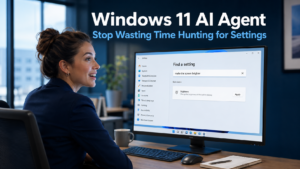
The Windows 11 AI Agent is a new feature being built into the Settings application that addresses one of the most common, low-level frustrations in everyday computing. Navigating through Windows Settings to find a specific option has always involved more clicking and guessing than it should. Microsoft is changing this by allowing users to simply describe what they want in plain English and letting the AI find or apply the relevant setting instantly.
What the Windows 11 AI Agent Does
The AI Agent is embedded directly in the search box within the Windows 11 Settings app. It is not a separate tool or a chatbot that needs to be opened in a different window. When a user types a description of what they want to do, such as making the screen brighter, turning on voice control, or adjusting notification preferences, the AI interprets the plain English request and either surfaces the relevant setting immediately or applies the change directly.
This removes the need to know the exact name of a setting or the submenu it lives in. Users do not need to remember whether accessibility options sit under System or Ease of Access, or whether display settings are in Personalisation or System. They simply describe what they need and the AI finds it.
The practical benefit is most visible for the kind of occasional settings changes that most people need to make every few weeks. Adjusting privacy preferences, changing a display setting before a presentation, enabling a feature that has been turned off, or troubleshooting a connectivity option are all tasks where the search for the right setting can take longer than the change itself. The AI Agent compresses that search to seconds.
How the Windows 11 AI Agent Handles Privacy
One of the most reassuring aspects of this feature is how Microsoft has approached data privacy. All processing happens locally on the device. The AI Agent does not send user queries to Microsoft’s servers or to any external cloud service. The plain English description a team member types stays entirely on their computer.
This is the same on-device processing approach used by other Windows 11 AI features currently rolling out for Copilot+ hardware, and it directly addresses the concern that AI features might create new data privacy risks for businesses. For businesses that handle sensitive client information or operate under data governance requirements, the fact that settings queries never leave the device provides meaningful reassurance.
The AI itself is a compact language model running locally, optimised specifically for interpreting settings-related requests rather than handling general-purpose conversations. This focus makes it fast and accurate for its intended purpose without requiring the processing power of a large cloud-based model.
Why This Matters for Business Teams
Every minute a member of staff spends navigating menus to find a setting they need is a minute not spent on productive work. When that problem is multiplied across a team of ten or fifteen people, each encountering the same friction occasionally throughout the week, the cumulative time cost becomes meaningful.
Beyond the time saving, there is a confidence dimension worth considering. Staff who feel unsure about how to change a setting often do one of two things. They either raise a support request, which consumes IT resource for a minor task, or they leave the setting unchanged and work around the limitation instead. Neither outcome is efficient. A tool that allows anyone to find and apply a setting in seconds, using plain English, removes both of these friction points.
For businesses in Burgess Hill and across Sussex where IT support is shared across a team or managed externally, reducing the volume of minor settings-related queries frees that support capacity for issues that genuinely require technical expertise. The Windows 11 AI Agent is effectively a first-line self-service tool that handles the most routine end of the settings navigation problem.
Which Devices Support the Windows 11 AI Agent
The feature is currently in testing through the Windows Insider Program for Copilot+ PCs. As with several other new Windows 11 AI capabilities, it requires a device with a Neural Processing Unit, or NPU, which is the specialist chip built into Copilot+ hardware for handling AI tasks locally and efficiently.
Standard Windows 11 devices without this hardware will not support the Windows 11 AI Agent in its current form. This is consistent with the pattern seen in other recent AI features for Windows 11, including natural language search and Fluid Dictation, both of which also require Copilot+ hardware.
Our article on Windows 11 natural language search covers another Copilot+ feature that uses the same on-device AI approach to make everyday tasks faster, and our article on Windows 11 Fluid Dictation covers a similar capability for voice input. Together, these features illustrate the growing practical case for Copilot+ hardware in business device planning.
For businesses currently planning hardware upgrades or replacements, checking whether prospective devices qualify as Copilot+ PCs is worth including in the evaluation. The range of AI features unlocked by this hardware is expanding with each update, and the investment in compatible devices positions a business to benefit from these improvements as they arrive.
When the Feature Will Be More Widely Available
The Windows 11 AI Agent is in testing through the Insider Program. This is the stage before a broader rollout, and features that reach this point typically progress to general availability over a period of weeks to months. Microsoft has not confirmed a specific release date.
For compatible Copilot+ devices, the feature will arrive through the standard Windows update process once released. No separate installation or configuration will be required. Businesses with compatible hardware will receive the update as part of their regular Windows maintenance.
Our managed IT services include device management and Windows update deployment for businesses across Sussex and the South East, ensuring features like this reach your team’s devices as they become available and are applied consistently across your fleet.
What This Means For Businesses
The Windows 11 AI Agent for Settings is a focused and practical improvement. It does not change how Windows works at a fundamental level. It removes friction from a routine task that every computer user encounters regularly, and it does so in a way that is private, fast, and requires no technical knowledge from the person using it.
For business owners and directors, the feature reinforces the practical case for Copilot+ hardware as the next hardware cycle approaches. The combination of natural language search, AI-assisted settings navigation, Fluid Dictation, and Onlooker Detection represents a growing suite of genuinely useful AI tools that are exclusive to Copilot+ devices. As these features mature, the productivity advantage of compatible hardware over standard Windows 11 devices will become more tangible.
Final Thoughts
Navigating through Settings menus to find a specific option is a small but persistent source of wasted time across every business that uses Windows. The Windows 11 AI Agent addresses this directly by turning that navigation into a plain English conversation that resolves in seconds.
For businesses with Copilot+ hardware, the feature will arrive through standard Windows updates once it progresses beyond testing. For those planning their next device refresh, it is a useful addition to the list of practical reasons that Copilot+ compatibility is worth prioritising.
It is a new AI-powered feature built into the search box within the Windows 11 Settings application. Rather than navigating through menus to find a specific option, users can type a plain English description of what they want to do. The AI interprets the request and either surfaces the relevant setting immediately or applies the change directly, without requiring the user to know where the setting is located.
No. All processing happens locally on the device. The AI Agent uses a compact language model running directly on the computer rather than sending queries to Microsoft’s servers or any external service. This means the plain English descriptions a user types never leave the device, which is an important consideration for businesses with data privacy requirements.
The feature is currently in testing on Copilot+ PCs, which are Windows 11 computers built with a Neural Processing Unit for handling AI tasks on-device. Standard Windows 11 computers without this hardware do not support the feature in its current form. Your IT provider can confirm whether your current devices qualify.
The feature is currently being tested through the Windows Insider Program. Microsoft has not confirmed a release date for general availability. Features at this stage of testing typically progress to wider release over a period of weeks to months. Compatible devices will receive the update through the standard Windows update process once it is released.
The existing Settings search requires fairly precise keyword matching. If you do not know the exact name of the setting, the search may not return useful results. The AI Agent interprets plain language descriptions, so a user can describe the outcome they want rather than the technical term for the setting. This is a meaningful difference for the many settings whose exact names are not immediately obvious to non-technical users.


