
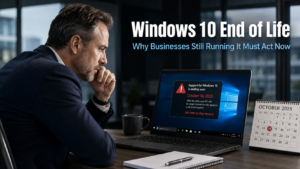
Windows 10 end of life arrives on 14th October 2025. After that date, Microsoft will stop issuing free security updates, bug fixes, and technical support for the operating system. If your business is still running Windows 10 on some or all of its devices, the time available to act properly is now extremely short. The decisions you make in the next few weeks will determine whether this deadline creates an orderly transition or a disruptive and costly scramble.
What Windows 10 End of Life Actually Means for Your Business
Many business owners assume that end of life simply means the operating system is no longer the latest version. In practice, it means considerably more than that.
After 14th October 2025, your Windows 10 devices will continue to function. They will switch on, run applications, and connect to the internet. However, Microsoft will no longer release updates to address newly discovered security vulnerabilities. Any weakness found in Windows 10 after that date will remain permanently unpatched.
Cyber criminals track these end-of-life dates carefully. When support ends, they know exactly where the gaps are and they know the gaps will never be closed. Devices running unsupported software become progressively more attractive targets over the months that follow. The longer a business continues running Windows 10 after end of life, the more exposed those devices become.
A recent survey found that 18% of business owners were unaware that Windows 10 support was ending. A further 14% were aware but had not yet started planning. That is nearly a third of businesses running a significant risk with very little time to address it. Our article on the Windows 11 upgrade covers the business case for moving in detail, but the urgency now is not about making the case. It is about acting before the deadline arrives.
What About Microsoft’s Extended Security Updates?
Microsoft offers Extended Security Updates, commonly referred to as ESUs, as a paid option for businesses that need more time beyond the 14th October deadline. For some organisations with specific constraints, this may be necessary as a short-term bridge.
However, ESUs are not a solution. They are a temporary extension purchased at a cost per device, and that cost increases each year. They do not bring Windows 10 up to the security standard of Windows 11. They do not provide access to the new features, improved performance, or AI capabilities that Windows 11 offers. They are a holding position for businesses that have run out of time to upgrade properly, not a substitute for making the move.
For most businesses, the cost and effort involved in purchasing ESUs while still planning a Windows 11 upgrade simply adds to the total burden. A planned, properly managed upgrade now removes the need for an interim paid extension entirely.
The Case for Moving to Windows 11 Now
Windows 11 is not simply a newer version of Windows 10. It is a more secure, more capable, and better-integrated operating system that reflects how modern businesses actually work.
Security improvements in Windows 11 are substantial. The operating system includes stronger built-in defences against the types of attack businesses face most frequently, including ransomware and phishing-related credential theft. These protections are not available in Windows 10, and they become more relevant with each passing month as threats evolve.
Windows 11 integrates more naturally with Microsoft 365 tools including Teams, OneDrive, and Copilot. For businesses already relying on these platforms, the day-to-day experience of using them is improved. The interface is cleaner, multitasking features are more refined, and the operating system is built to support the hybrid and remote working patterns that have become standard across many businesses.
AI capabilities are another growing reason to move. Microsoft is building an expanding range of AI-powered features into Windows 11, from smarter search through to voice dictation, screen privacy, and document generation. These features require Windows 11 and, in some cases, compatible hardware. Businesses that delay the upgrade continue to miss out on these tools as they arrive.
The Hardware Question: What You Need to Know Before the Deadline
One factor that makes the Windows 10 end of life deadline more complex is hardware compatibility. Not every device currently running Windows 10 can run Windows 11. The operating system requires a compatible processor, a minimum amount of memory, and a security chip called TPM 2.0.
Devices that do not meet these requirements cannot be upgraded to Windows 11 directly. For older machines, replacement is the appropriate path. This is not a reason to delay. It is precisely the reason to act now rather than later.
If your business discovers in the week before October 14th that several devices need replacing, you face a rushed procurement process, potential stock availability issues, and a period of disruption that a properly planned approach would have avoided entirely. Starting the hardware assessment now gives you the time to make informed decisions, budget correctly, and manage the transition without pressure.
Our managed IT services include hardware assessments and Windows 11 compatibility checks for businesses across Sussex and the South East, providing a clear picture of where you stand and what the upgrade involves before any commitments are made.
What a Properly Managed Transition Looks Like
For businesses that have not yet started, the most important step is to establish the current position as quickly as possible. A hardware inventory, a compatibility check against Windows 11 requirements, and a clear list of which devices can be upgraded and which need replacing form the foundation of any sensible plan.
From there, the upgrade itself can be prioritised. Devices handling the most sensitive data or the most business-critical functions should move first. Where hardware replacement is needed, those procurement decisions can be made in the right order rather than under emergency conditions.
Staff awareness also matters, even at this late stage. Windows 11 looks and behaves differently to Windows 10 in several respects. A brief introduction to the key changes before devices are updated removes much of the friction that can otherwise slow adoption and generate unnecessary support requests in the days immediately following the switch.
Data backup before any upgrade takes place is essential. Our article on how to back up your business data covers the approach that ensures your information is secure before any significant system changes occur.
What This Means For Businesses
The Windows 10 end of life deadline is fixed. It does not move. Businesses that are still running Windows 10 on 15th October 2025 will be operating on unsupported software, and that exposure grows with every week that follows.
For business owners and directors in Burgess Hill and across Sussex who have not yet completed this transition, the questions to answer are simple and urgent. Which devices are still running Windows 10? Which of those can be upgraded and which need replacing? What is the plan for getting this done before the deadline, or as close to it as possible?
If those questions do not yet have clear answers, the next call you make should be to whoever manages your IT. Ask directly: are we ready for Windows 10 end of life? If the answer is anything other than a confident yes, making a plan is the immediate priority.
Final Thoughts
Windows 10 end of life is not a distant consideration. It is an imminent deadline with real consequences for business security. Devices left on Windows 10 after October 14th become progressively more vulnerable, and the gap between their protection and the current threat landscape will only widen over time.
The businesses that handle this well are those that treat it as the urgent operational priority it is. The window to act properly is narrow. Use it.
Your devices will continue to work normally. However, Microsoft will stop releasing security updates, bug fixes, or technical support for Windows 10. Any vulnerability discovered after that date will remain permanently unpatched, making those devices increasingly attractive targets for cyber criminals over time.
Yes. Microsoft offers Extended Security Updates as a paid option, charged per device. The cost increases each year. ESUs are intended as a short-term bridge for organisations with specific constraints, not as a long-term solution. They do not provide the security improvements, features, or performance of Windows 11, and businesses using them still need to plan and complete an upgrade to Windows 11.
Not necessarily. Windows 11 requires a compatible processor, a minimum of 4GB of memory, 64GB of storage, and a TPM 2.0 security chip. Computers manufactured before 2018 or so may not meet these requirements. A hardware compatibility check, which your IT provider can carry out quickly, will identify which devices can be upgraded and which need replacing.
This varies depending on the number of devices involved, how many require hardware replacement rather than software upgrade, and how the transition is managed. For a small business with all-compatible hardware, the technical upgrade process can be completed relatively quickly. For businesses requiring hardware replacement or managing a larger team, a phased approach over several weeks is more realistic. Starting now gives you the time to do this properly.
Work with them to build a prioritised plan immediately. Identify which devices are most critical and which are most at risk if left unupgraded. Prioritise those first. Where hardware replacement is needed, begin procurement as quickly as possible. The goal is to minimise the number of devices still running Windows 10 after October 14th and to have a clear timeline for completing any remaining transitions.


