Digital Fraud Protection: Simple Habits That Keep Your Business Safe
Digital fraud protection has become a more pressing business concern than ever before. Scams are no longer the clumsy, obvious attempts that were easy to dismiss. AI tools have made fraudulent messages more convincing, pressure tactics more sophisticated, and the visual quality of fake websites and emails indistinguishable from genuine ones in many cases. However, the habits that protect businesses remain practical and accessible. The challenge is making sure those habits are consistent across the whole team.
The First Tactic Every Scammer Uses: Manufactured Urgency
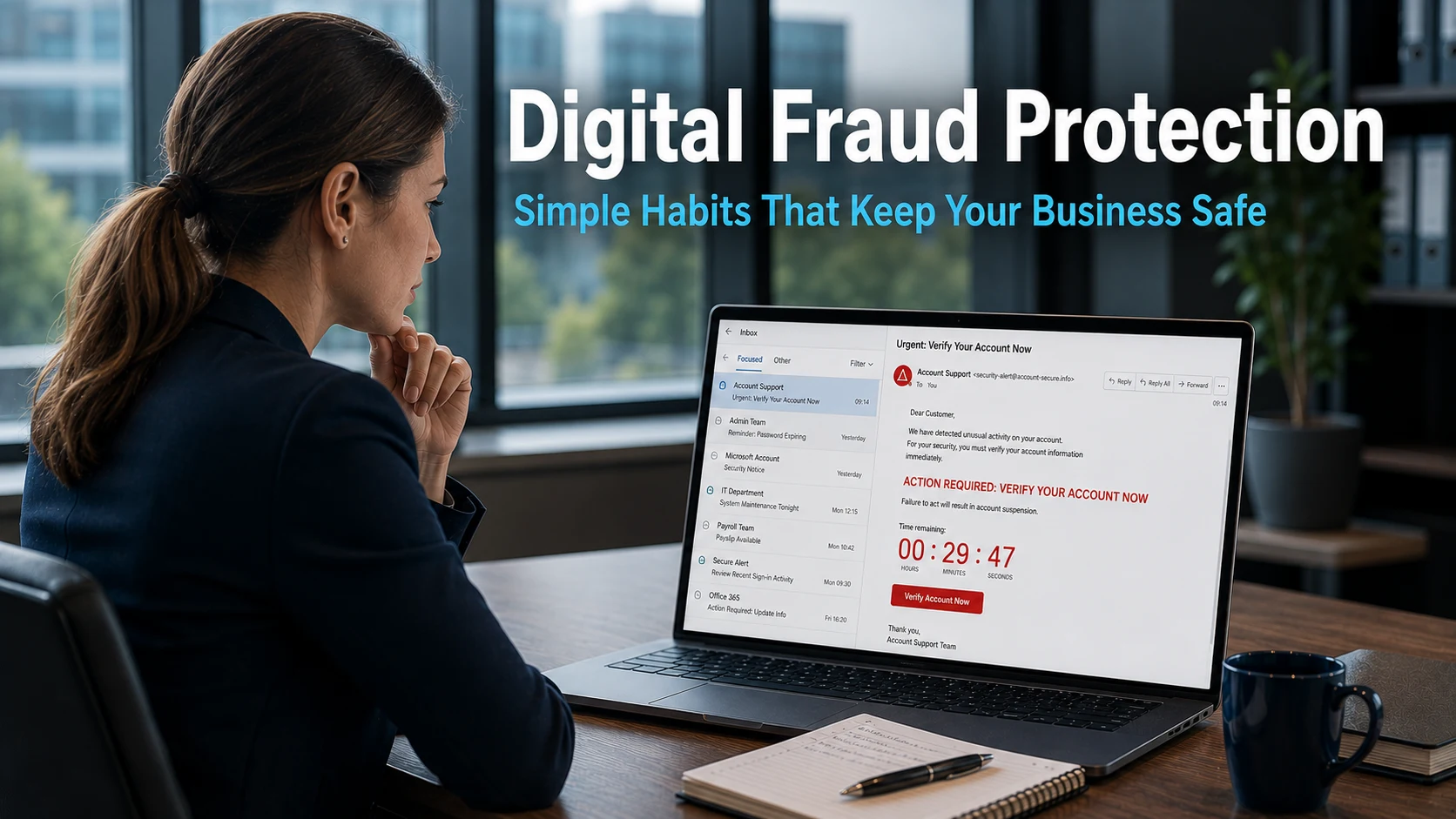
Digital fraud protection starts with recognising the most universal feature of almost every scam: the pressure to act immediately. Countdown timers, urgent account warnings, claims that a delivery will be returned unless you respond now, notifications that your account will be closed within minutes. These are not incidental elements of a scam. They are the mechanism that makes scams work.
When someone feels pressured and stressed, their instinct is to resolve the problem quickly rather than think carefully about whether it is real. Scammers engineer exactly this response because it causes people to act before they have time to question what they are doing. The moment that pressure creates a sense of urgency, the scam is already working as intended.
The single most effective response to urgency in a message is to pause. Stop before clicking anything. Think about whether the request makes sense. Then verify through a trusted, independent source. Visit the genuine company’s website by typing the address directly into the browser. Call a phone number you find there yourself, not one provided in the suspicious message.
This habit, stopping when urgency is felt rather than acting on it, removes the primary lever that digital fraud relies on. It does not require technical knowledge. It does not require specialist training. It simply requires the discipline to pause before responding to any message that creates pressure.
What Digital Fraudsters Are Usually After
Understanding what scammers want helps your team recognise when a request is crossing a line that no legitimate organisation would cross. The vast majority of digital fraud targets two things: money and data.
Fake messages typically create a plausible scenario to request one of these. A problem with a bank account. A missed delivery requiring a small redelivery fee. A locked account needing immediate verification. A prize waiting to be claimed. Each scenario is designed to feel both urgent and routine, something that could genuinely happen and that requires a small, reasonable action to resolve.
The line that no genuine organisation crosses is requesting full bank details, passwords, or remote access to a device through an unexpected email, text message, or phone call. Banks do not ask for full account numbers or PIN codes over email. Software companies do not call unexpectedly and ask to take control of your computer. Delivery companies do not request payment through a link in a text message sent without prior notification.
When a message requests any of these things, it is a scam regardless of how professional it looks or how credible the explanation sounds. Building this understanding across your team means staff have a clear and reliable indicator that does not depend on visual design or writing quality.
Our article on business email compromise covers how attackers impersonate trusted figures to manipulate staff into crossing exactly these lines, and what the consequences look like in practice.
The Technical Defences That Make Digital Fraud Protection Meaningful
Awareness is essential but not sufficient on its own. Digital fraud protection requires a layer of technical measures that continue to work even when human judgement fails or when an attack is simply too convincing to spot.
Multi-factor authentication is the most impactful single measure available to any business. It requires a second verification step when logging into an account, typically a code sent to a mobile phone or generated by an authenticator app. Even when a scam successfully captures a staff member’s password, multi-factor authentication prevents those credentials from being used without this second factor. The attacker holds a valid password and cannot use it. Our article on strengthening your business security covers how to implement multi-factor authentication across your organisation.
A password manager removes one of the most persistent vulnerabilities in business security: reused and weak passwords. When the same password is used across multiple accounts, a breach at any one service exposes them all. A password manager generates a unique, strong password for every account and stores them securely, so staff do not need to remember or create them manually. Our article on secure passwords covers the practical approach to getting this right across a team.
Software updates close the gaps that scammers actively exploit. Many successful digital fraud attacks do not rely on deception alone. They exploit vulnerabilities in unpatched software that give attackers access without requiring anyone to click a link or enter a password. Keeping all business software current, including operating systems, browsers, and applications, removes a significant category of risk.
Reviewing Connected Apps and Devices
One area of digital fraud protection that most businesses overlook is the review of which applications and devices have access to business accounts. When staff use a single login to access multiple services, or when work accounts are connected to third-party applications over time, the list of things with access to a business account can grow significantly without anyone actively managing it.
Old devices, applications that are no longer in use, and services that were granted access for a one-off purpose all represent standing access points that have not been reviewed. If any of these are compromised at some point in the future, they provide a route into your accounts that bypasses the usual login process. Checking connected apps and devices periodically through the security settings of each platform, particularly for email and cloud storage accounts, takes only a few minutes and closes access points that should no longer be open.
This connects to the broader principle of limiting access to only what is currently needed and actively used. Our article on staff data access and permission management covers how the same principle applies to internal business systems and why regular access reviews matter.
Reporting Scams Is Part of the Defence
One final habit worth building into your team’s approach is reporting. When a staff member encounters a phishing email, a suspicious text, or a fraudulent website, reporting it takes only moments but contributes to broader protection that goes beyond the individual business.
Reports to the National Cyber Security Centre, Action Fraud, or the relevant platform help identify active campaigns, take down malicious websites, and warn other businesses. Every report makes the next scam slightly less likely to succeed against someone else.
Internally, a clear and welcoming reporting process also means that near-misses are captured rather than quietly forgotten. A staff member who almost clicked a suspicious link but paused and verified provides valuable information about the types of attack currently reaching your team. That intelligence is useful for keeping awareness current and relevant.
For businesses in Crawley and across Sussex, our cyber security page covers how a structured approach to digital fraud protection, combining staff awareness with appropriate technical measures, provides the most resilient defence available.
What This Means For Businesses
Digital fraud is evolving quickly, but the fundamental habits that protect businesses have not changed as dramatically as the attacks themselves. Pausing when urgency is felt, knowing what legitimate organisations will and will not ask for, using multi-factor authentication, keeping passwords strong and unique, and keeping software updated are all measures that remain effective regardless of how convincing the scam looks.
For business owners and directors, the practical question is whether these habits are consistently in place across your whole team. Awareness that exists in some staff members but not others leaves gaps that scammers can find. Technical protections that are active on most accounts but not all provide incomplete coverage. Consistency is what turns good individual habits into effective business-wide digital fraud protection.
Our managed IT services include security configuration, staff awareness support, and ongoing monitoring for businesses across Sussex and the South East, helping business owners ensure that digital fraud protection is coherent and complete rather than patchy and reactive.
Final Thoughts
Digital fraud is getting smarter. The scams reaching your team today are more convincing than those from a year ago, and next year’s will be more convincing still. However, the defence does not need to match the attack in sophistication to be effective.
Calm, consistent habits and the right technical tools in place mean that even when a scam looks entirely professional, its ability to cause harm is significantly limited. Build these habits across your team, keep the awareness current, and make sure the technical protections are properly configured. That combination remains effective regardless of how the attacks evolve.
>
What is the most reliable way to tell if a message is a scam?
No single visual indicator is reliable, particularly as AI makes scams look more professional. The most reliable approach is to verify through an independent source before taking any action. If an email claims to be from your bank, navigate directly to the bank’s website by typing the address yourself and check whether the notification appears there. Do not use contact details provided in the suspicious message itself.
What should a business do if a staff member falls for a digital fraud scam?
Act quickly. If credentials were entered on a suspicious page, change the affected passwords immediately and contact your IT provider. If a payment was made, contact your bank as soon as possible, as there may be a limited window in which a transaction can be recalled. Report the incident to Action Fraud. The sooner the response, the better the chance of limiting the damage.
Does multi-factor authentication protect against all digital fraud?
Not against all fraud, but against a significant proportion of it. Multi-factor authentication prevents stolen passwords from being used to access accounts without the additional verification step. It does not prevent payments made directly by a deceived employee or stop malware that is installed through a download. It is one important layer of a broader defence rather than a complete solution on its own.
How often should a business review which apps and devices have access to its accounts?
At minimum, annually. Many businesses benefit from doing this review whenever there is a significant change in the team or the tools being used. It takes only a few minutes per account and removes standing access points that are no longer needed or recognised. It is a simple step that closes a category of risk that grows quietly without anyone actively managing it.
Is it worth reporting scams if nothing happened?
Yes. Reports of phishing emails, fake websites, and fraudulent messages help the National Cyber Security Centre and Action Fraud identify active campaigns, take down malicious infrastructure, and warn other businesses. A near-miss that is reported contributes to protection that goes beyond your own business. It is also worth reporting internally, as it helps keep your team’s awareness of current tactics up to date.