Microsoft Copilot Memory Feature: You Decide What AI Remembers About Your Business
· Updated
The Microsoft Copilot memory feature is a significant update that changes how the AI assistant works within your business on a daily basis. Until now, Copilot has been useful for individual tasks within a session, but starting each new conversation from scratch has limited how personalised and efficient it can be. Microsoft is addressing this directly by giving users control over what Copilot retains between sessions and what it forgets.
What the Microsoft Copilot Memory Feature Does
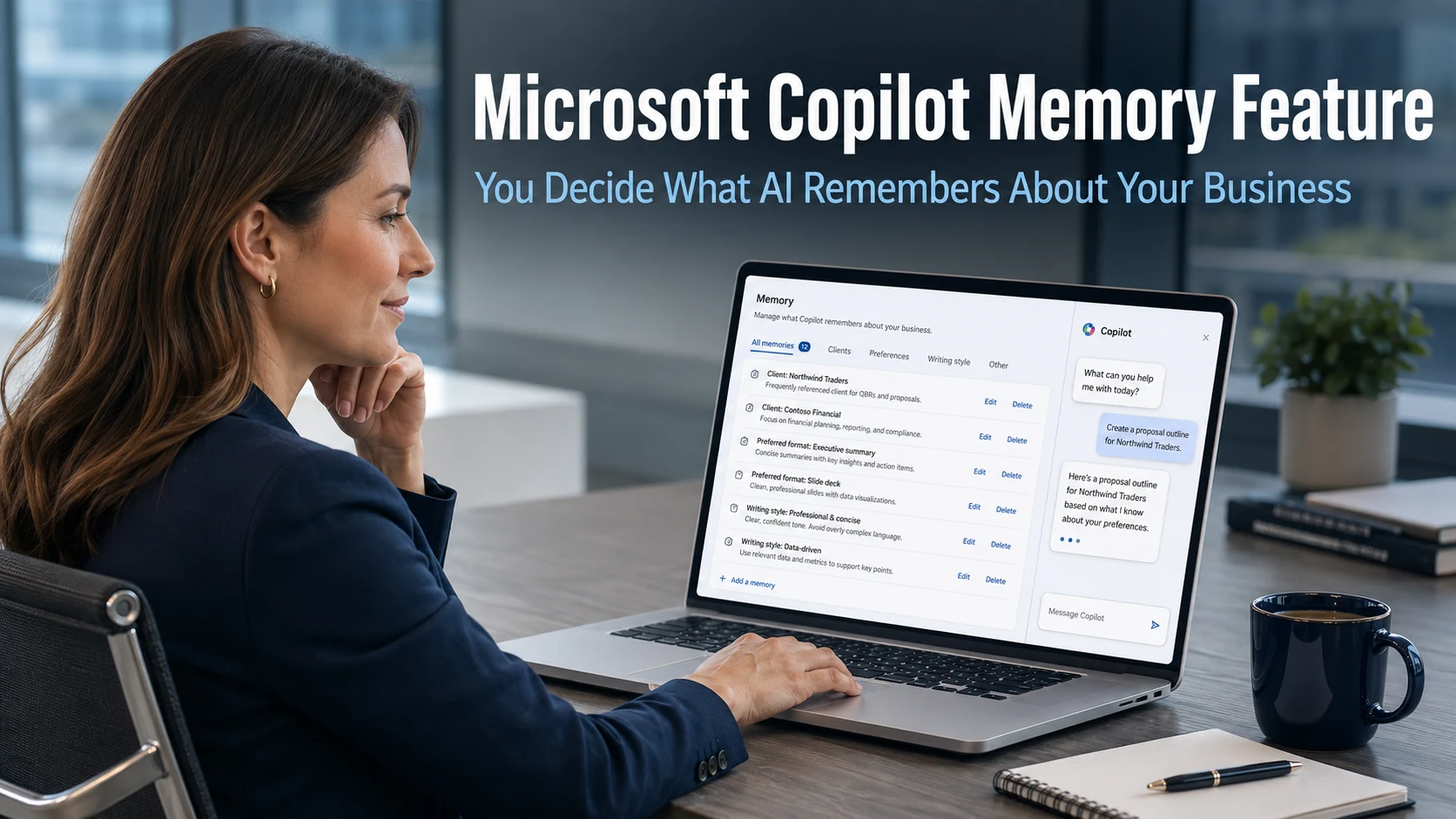
Microsoft Copilot is adding memory management capabilities that allow users to build a persistent understanding of their working preferences, business context, and regular requirements. Rather than re-explaining the same information every time you open Copilot, you can now tell it to remember specific details. Those details carry forward into future sessions, making responses more relevant and faster to produce.
Users can explicitly instruct Copilot to remember something by telling it directly during a conversation. Upcoming updates will also introduce a dedicated memory management page where everything stored can be viewed in one place. From that page, individual items can be edited or deleted at any time. If a client’s name changes, a preferred format evolves, or any stored detail is no longer accurate, it takes a moment to update or remove.
This combination of persistent memory and user control is the key characteristic that makes the update meaningful. Copilot becomes more useful the more context it holds. The fact that the user governs exactly what is retained and what is cleared means that usefulness is not traded against control.
Why the Microsoft Copilot Memory Feature Matters for Businesses
The practical benefit becomes clear when you consider how much time business teams spend re-establishing context. A team member using Copilot to draft a client proposal needs to explain who the client is, what format the proposal should take, and what tone is appropriate for that relationship. When done repeatedly, this setup time adds up.
With the memory feature in place, Copilot already knows these details. The team member can focus immediately on the content of the proposal rather than orienting the AI to the task. Similarly, if Copilot retains your standard report structure, your preferred writing style, or the names and roles of key contacts, the output it produces from the outset is more aligned with what your business actually uses.
For businesses in Crawley and across Sussex that use Copilot regularly across multiple team members, the cumulative time saving from reduced setup and correction across each session becomes meaningful over weeks and months. The AI becomes a more effective working tool the more it understands about the business context it is operating in.
The Connectors Update: Linking Copilot to Your Business Data
Alongside the memory feature, Microsoft is expanding Copilot’s Connector capabilities. Copilot can already link to OneDrive, allowing it to access and work with files stored in your Microsoft 365 environment. The upcoming update adds Google Drive as a further connector, meaning businesses that use Google’s cloud storage alongside Microsoft 365 will be able to work with documents from both sources through a single Copilot interface.
This is a practical change for businesses with mixed cloud storage setups. Rather than opening files manually from different locations, a team member can ask Copilot to retrieve a document, summarise a folder of files, or surface relevant information from stored data, regardless of which platform holds it. The result is fewer steps between having a question and getting an answer from your own business information.
Microsoft has indicated that additional services will be added as connectors over time, broadening the range of business tools Copilot can draw on. For businesses that already have a well-organised cloud storage environment, this creates a more joined-up and efficient way to work with the information that is already there.
Our cloud management page covers how businesses can ensure their Microsoft 365 and cloud storage environments are properly structured to take advantage of integrations like this as they become available.
Privacy and Control With Copilot Memory
The memory feature raises an obvious question for businesses that handle sensitive client or commercial information: what does Copilot retain, and where is it stored?
Microsoft has built the feature around explicit user control specifically to address this concern. Nothing is stored without the user directing Copilot to remember it. The dedicated memory management page provides full visibility of what has been retained. Individual items can be deleted instantly. There is no background accumulation of information that the user is unaware of or cannot remove.
For businesses with specific data governance requirements, it is worth reviewing how memory management interacts with your Microsoft 365 administrative controls. In many cases, Microsoft 365 administrators can manage AI feature settings centrally across an organisation. Understanding what controls are available before the feature becomes widely active is a sensible preparation step.
Our cyber security page covers how data governance considerations should inform your approach to AI tool adoption, including new features like this as they roll out.
Where the Feature Is Available and What Comes Next
The Microsoft Copilot memory feature is rolling out across the web version of Copilot, Windows 11, and mobile devices. Some elements of the update are expected to be available within existing subscription plans, while certain capabilities may be part of Copilot’s paid tier. Microsoft has not confirmed the full breakdown of what will be included at which level.
For businesses with a Microsoft 365 Copilot subscription, keeping applications updated ensures the feature reaches devices as it becomes generally available. For those without a Copilot subscription, this update adds to the growing case for considering whether the productivity benefits across Copilot’s expanding capabilities justify the addition.
Our article on generative AI for business covers the broader context of how businesses are integrating AI tools like Copilot into their daily operations and where the most significant productivity gains are being found.
What This Means For Businesses
The Microsoft Copilot memory feature moves Copilot from a useful session-based tool to something closer to a persistent AI assistant that understands your business context. The difference in practical usefulness between a tool that starts fresh every time and one that retains relevant context is significant, particularly for teams using Copilot frequently across different types of work.
For business owners and directors, the practical consideration is twofold. First, make sure your team is aware this feature is arriving and understands what it offers, so they can make deliberate use of it rather than discovering it by accident. Second, if your business handles sensitive data, check what administrative controls your Microsoft 365 environment provides over memory and AI feature settings before the update becomes widely active.
Our managed IT services include Microsoft 365 management and configuration for businesses across Sussex and the South East, ensuring your team has access to the features available to them and the right governance settings in place as AI capabilities within Microsoft 365 continue to expand.
Final Thoughts
The Microsoft Copilot memory feature is a thoughtful update that makes a useful AI tool meaningfully more useful without removing user control. The ability to build context over time, combined with the ability to edit or clear that context at any moment, addresses the two things that matter most in a business context: efficiency and trust.
As Copilot continues to develop, the combination of memory, expanded connectors, and growing integration with Microsoft 365 applications points toward an AI assistant that becomes genuinely embedded in how business teams work. The businesses that explore these capabilities early and build good habits around using them will be best placed to benefit as the toolset matures.
What is the Microsoft Copilot memory feature?
It is a new capability that allows Copilot to retain information between sessions rather than starting fresh each time. Users can tell Copilot to remember specific details such as client names, preferred formats, or writing style. A dedicated memory management page will allow users to view, edit, or delete anything stored at any time.
Is the Copilot memory feature available now?
The feature is rolling out progressively across the web version, Windows 11, and mobile. As with most Microsoft updates, availability varies by account and region and arrives through standard application updates. Your IT administrator can check your Microsoft 365 admin centre for rollout status relevant to your organisation.
What are Copilot Connectors and how do they help businesses?
Connectors allow Copilot to link to external data sources and retrieve or work with files from those services. Copilot already connects to OneDrive, and Google Drive is being added. This allows users to ask Copilot to fetch documents, summarise folder contents, or surface information from stored data without opening each file manually, regardless of which cloud storage platform holds it.
Is there a privacy risk with Copilot storing information about my business?
Microsoft has designed the feature around explicit user control. Nothing is retained without the user directing Copilot to remember it, and everything stored can be viewed, edited, or deleted at any time through the memory management page. For businesses with specific data governance requirements, Microsoft 365 administrative controls may provide additional options for managing AI feature settings centrally.
Do I need a paid Copilot subscription to use the memory feature?
Microsoft has indicated that some elements will be available within existing plans while others may be part of a paid tier. The full breakdown has not yet been confirmed. Your IT provider or Microsoft 365 administrator can advise on what is included in your current subscription and what additional access would involve.