
IT Support for Schools

Schools need technology that simply works when a lesson starts, and that keeps children safe online. Between classroom devices, Wi-Fi, safeguarding and a growing list of Department for Education standards, there's a lot to keep on top of. We help schools across Sussex run reliable, secure IT, explained in plain English for headteachers, business managers and governors.
Working Towards the DfE Standards
The Department for Education has set out digital and technology standards for schools and colleges, and expects them to be working towards six core standards by 2030: broadband internet, wireless network, network switching, digital leadership and governance, filtering and monitoring, and cyber security.
We review where your school stands against each one, then give you a clear, prioritised plan and budget to close the gaps.
Keeping Pupils Safe Online
Schools have a duty to keep children safe online, which includes having effective filtering and monitoring in place. We help you choose, set up and check the right tools, and make sure your safeguarding lead gets the reports they need.
We also protect staff accounts and the school's data with two-step sign-in, email filtering and backups, because schools are a regular target for cyber attacks.
Wi-Fi and Devices That Work in Every Classroom
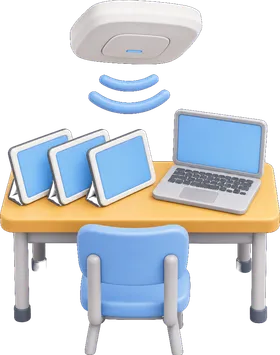
When the Wi-Fi drops halfway through a lesson, learning stops. We survey your site and put in networks that cope with a full class of devices at once, then look after laptops, tablets, interactive screens and staff computers so they're ready when lessons start.
Schools We've Worked With

- 17+ years supporting Sussex IT, since 2009
- 70+ businesses and charities we look after
- 3 Sussex offices: Burgess Hill, Hailsham and East Grinstead
- 5 people in our friendly, local team
-
 Cyber Essentials certified
- Microsoft Certified Professional
- Microsoft Cloud Solution Provider (CSP)
Helpful Guides for Schools
- Shared Computers at Work: How to Keep Shared Devices Secure
- Fake Meeting Invites: The Calendar Scam Slipping Past Email Filters
- Fake Quote Request Emails: The Scam Aimed at Your Sales Team
- Old Business Passwords: Why That Login You Created Years Ago Could Be a Security Risk
- Real Login Page Phishing: Why a Genuine Microsoft Page Is No Longer a Safety Signal
- When Should Businesses Use MFA to Protect Access?
Local IT Support Near You
From our offices in Burgess Hill, East Grinstead and Hailsham, we look after businesses across Sussex and the surrounding area. Find your town:
- IT support in Burgess Hill
- IT support in East Grinstead
- IT support in Hailsham
- IT support in Brighton & Hove
- IT support in Crawley
- IT support in Eastbourne
- IT support in Hastings
- IT support in Haywards Heath
- IT support in Horsham
- IT support in Lewes
- IT support in Littlehampton
- IT support in London
- IT support in Petworth
- IT support in Pulborough
- IT support in Reigate
- IT support in Uckfield
- All locations
Get It Green
We call our process Get It Green. It's how every new client starts with us, and how we look after your IT from then on.
-
Free IT audit
We spend around half a day with you, looking at your devices, network, accounts, security and suppliers to see exactly where you are today.
-
Your RAG report
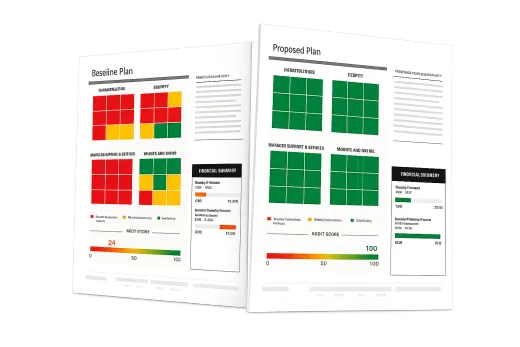
We turn what we find into a simple red, amber and green report, so you can see your IT at a glance. Many clients tell us it's the first time their IT has really made sense.
-
Agree the plan
The report includes a target: getting every red and amber area into the green. We agree the priorities with you, then put the plan in place.
-
Keep it green
We look after everything day to day, monitor your systems around the clock and review your report with you regularly, so it stays green.
Frequently Asked Questions
What are the DfE digital and technology standards?
They are the Department for Education’s recommended standards for school technology, covering areas such as broadband, Wi-Fi, network switching, digital leadership, filtering and monitoring, and cyber security. Schools and colleges are expected to be working towards the six core standards by 2030.
Can you help with filtering and monitoring?
Yes. We help schools choose, set up and regularly check filtering and monitoring so it meets the standard, and make sure the right people get alerts and reports.
Do you work with the IT the school already has?
Yes. We start with a free review of what you have, keep what works and plan any changes around your budget and the school year, so there's no disruption during term time.
How quickly do you respond to support requests?
Every support request is triaged the moment it arrives and routed to the right person, so you're dealing with someone who can actually fix it. We respond within the hour, and in practice it's usually within seconds.
How quickly will you reply to a new enquiry?
If you're thinking about working with us, we'll reply within one working day, though during office hours it's usually within a few minutes.
Do you offer support outside office hours?
Our main support runs during office hours, and we also look after clients who need out-of-hours cover. Our security monitoring never sleeps: it watches your systems around the clock, every day of the year.
Will I be tied into a long contract?
No. We're confident you'll see the value of what we do, so there's no lock-in during your first year. Once we've got your systems up and running and secure, usually within 30 days, you're free to leave if we're not the right fit. After your first year we usually move onto a 12-month agreement.
Do you offer pay-as-you-go support?
We don't offer pay-as-you-go support, because keeping your IT reliable means looking after it properly every month rather than only when something breaks. If you'd like to see how we work first, many clients start with a one-off project.
Do you come on-site?
Yes. Most issues are fixed remotely within minutes, but we also visit in person. We aim to see every client on-site at least once a month, and in reality it's often a lot more. With offices in Burgess Hill, Hailsham and East Grinstead, we can reach most of Sussex quickly.
What happens in the free IT audit?
We spend around half a day collecting information about your devices, network, accounts, security and suppliers. You then get a red, amber and green (RAG) report that shows your IT at a glance, along with a clear plan for getting every red and amber area into the green. We call it Get It Green.